Building a custom Qubes 4.1 Kernel on Fedora workstation 39
I’m currently test driving Qubes as my daily-driver OS, running on a Framework 13” laptop.
The reasons I want to like Qubes are many, but top of the list: Being able to carry one device that suits many, isolated, personas such as personal, work, pentest, throwaway VM’s for malware research, etc.
However, the framework (and most modern laptops) use thunderbolt three (over USBC) for external monitors, and Qubes disables PCI_HOTPLUG by default in the kernel to protect against direct memory access (DMA) attacks, which means that unless you boot the machine with the monitor plugged in and then never unplug/replug, it wont work.
This is good for security, but too far for me on the risk/usability spectrum. I need to change my kernel config to PCI_HOTPLUG=1 and rebuild.
Qubes has a full automated build system, the getting started documentation is here: https://www.qubes-os.org/doc/qubes-builder/
It says you can build just specific components as needed, and the build should work on any recent Fedora install.
This isn’t quite true especially if you just want to compile a custom kernel. Here are my additional steps to get this working on a fresh install of Fedora workstation 39.
 Building without errors, finally!
ONE:
Use a VM: I initially tried with a Fedora docker container, the build docs say it only uses chroot, but errors mid-builds complaining about a lack of systemd components and access to mountpoints gave me headaches. I’m sure a privileged container with some systemd deps and libraries would work, but at the cost of how much time? When I realised i’d have to kill the existing container and follow the process again in a new one just to find out, I decided a persistent VM for future builds would be more sensible.
TWO :
setenforce 0 SELinux breaks things, you’ll get all kinds of random build errors, it’s not enabled (ironically) in Qubes, so turn this off for your build env.
THREE:
Follow the build guide, stop before the make qubescommand. Here we’re going to want to make extra modifications to the builder.conf file. Uncomment the lines USE_QUBES_REPO_VERSION=4.1 and USE_QUBES_REPO_TESTING=1 remove extra symbols and whitespace so they look like above.
The build tooling seems to expect certain Qubes packages, if we’re not building them (we care about the kernel) it needs to get them as deps from somewhere.
This is what the community says about these two lines of the builder.conf, however, I also found that without them parts of the build would just flat out fail even if building the all components of Qubes in the expected order.
FOUR:
Make your custom changes, I edited the following two files to ensure the commented out line PCI_HOTPLUG=1 was set.
- qubes-builder/qubes-src/linux-kernel/config-qubes
- qubes-builder/qubes-src/linux-kernel-latest/config-qubes
By default, your builder.conf will be targeting a much newer Fedora version than the stable Qubes versions. This will need editing or you’ll end up with a Kernel built with different deps than the rest of your DOM0 and it won’t install (such as LibC version missmatches).
Do a uname -a in the Terminal on your Qubes DOM0. Mine running Qubes 4.1 shows Linux dom0 6.6.2.1-qubes.fc32.x86_64 The important bit here is fc32. Edit your builder.conf and set your DIST_DOM0=fc32 so it matches (the default at the time of writing in the builder.conf was fc37 and that won’t work. I didn ‘t notice this initially and learnt the hard way).
You will also need to bump /qubes-builder/qubes-src/linux-kernel/rel and /home/matt/qubes-builder/qubes-src/linux-kernel-latest/rel files from 1 to 2 otherwise the RPM built will conflict with the existing RPM (same version number) and won’t install as a newer version.
FIVE:
Some build steps seem to partially build the build environment chroot, so despite the documentation saying you should just be able to make linux-kernel I found this would fail with errors for missing files and packages. However, building the first couple of components in the make help components list, seems to build out our chroot environment properly.
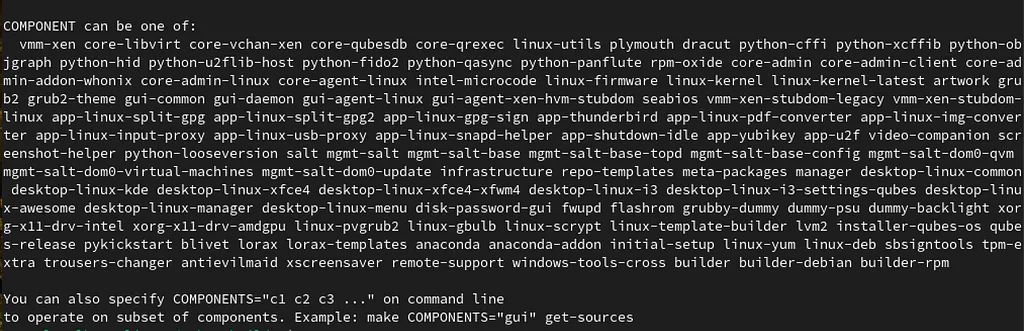 Many components. I built vmm-xen and core-libvirt first to give a working chroot build environment.
To do this, first run make vmm-xen core-libvirt these should complete fine.
next try to make core-vchan-xen core-qubesdb core-qrexec linux-utils
This errored fairly quickly for me in the core-vchan-xen build, with issues validating a Debian qubes-os repository:
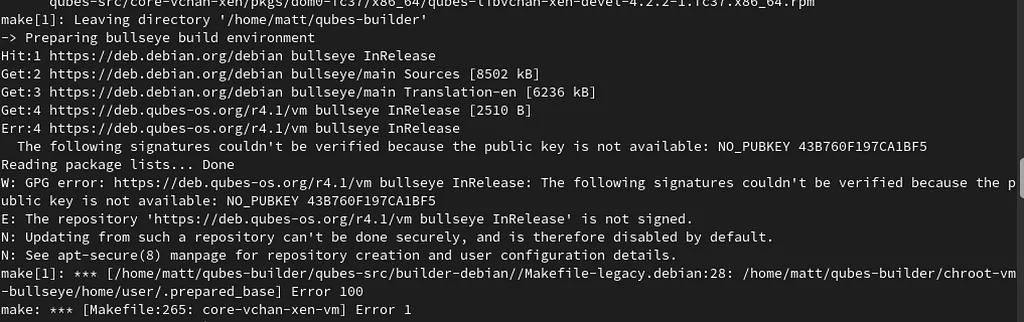 Error in building core-vchan-xen
My solution to this was to mark the repo as trusted in the following path:
- qubes-builder/chroot-vm-bullseye/etc/apt/sources.list
Change:
deb [arch=amd64] https://deb.qubes-os.org/r4.1/vm bullseye-testing main
deb [arch=amd64] https://deb.qubes-os.org/r4.1/vm bullseye-testing main
To add trusted=yes :
deb [arch=amd64 trusted=yes] https://deb.qubes-os.org/r4.1/vm bullseye-testing main
deb [arch=amd64 trusted=yes] https://deb.qubes-os.org/r4.1/vm bullseye-testing main
I wouldn’t be so blasé to mark a repo as untrusted without verification if we were building our own Qubes debian VM, but in my case I just want the kernel build to run successfully. It’s possible we dont even need core-vchan-xen to be built, but we do need linux-utils and this process worked for me for that (and then the kernel) to build successfully.
Now re-build these components, they should build successfully:
make core-vchan-xen core-qubesdb core-qrexec linux-utils
SIX and FINALLY!
BUILD our new kernel. This should create you the needed RPM packages to install directly into your Qubes DOM0.
make linux-kernel linux-kernel-latest
 Success! New Kernel (notice the 62–2 from our
 rel file update in qubes-src/linux-kernel)
Getting your RPM’s to your DOM0 is intentionally hard (as you’re meant to keep your DOM0 as offline-as-possible given it’s power over the whole Qubes system.
However, you can also move files from a regular Qube to DOM0 with a bit of messing and I followed this route for testing, then ran rpm -i kernel-devel-.rpm kernel-modules-.rpm and kernel-*.rpm to install.
Happy hacking!
Originally published on Medium on 17 January 2024.